Kichitto Kichitto
AI integration Download on the App Store
iOS & Android available now

Receipts and invoices, in your own Google Drive.
Books your own AI can read.

Receipts and invoices for solo founders. Snap once and AI logs it; issue invoices from the app; connect Claude or another MCP-capable AI and your books answer questions.


Works with Claude MCP-capable AI CLI MCP
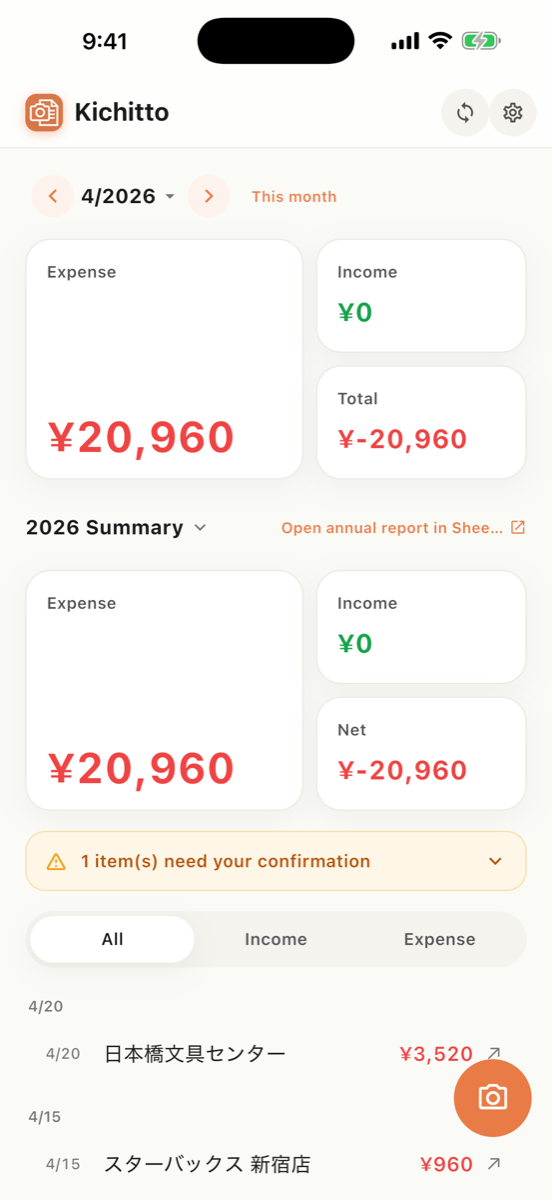
Kichitto inbox screen (actual app screenshot)

Data lives in your Drive

Saved to your own Google Drive. We never hold your data.

Logged in one tap

Seconds from photo to record. Zero manual entry.

One link to your accountant

Just share the Drive URL. No exporting or tidying up.

AI integration

Your own AI reads your books.

Just add the connector to Claude, or to any AI CLI where you can configure MCP. Available on every plan, including the free one.

Total this fiscal year's expenses by category

FY2026 (Apr–Jul) expenses total ¥412,800.

Meetings ¥68,000
Supplies ¥121,300
Travel ¥94,500
Telecom ¥48,000
Contractors ¥81,000

3 expenses are missing an invoice registration number. Want to review them?

Connects to Claude (MCP). Also works from any AI CLI where you can configure MCP.

"Find the receipt from XYZ Corp" — answered with a Drive link to the original.
"Reconcile this bank statement against my books and list what is missing"
"Are there duplicate entries? Which expenses have no T-number?"
Missing entries can be added on the spot — but always propose → your confirmation → write, with the server validating tax and totals. Existing records can never be modified or deleted.
Read the setup guide →
How it works

Bookkeeping, done in three steps

01

Capture

One tap per receipt. AI extracts vendor, date, amount and T-number, then appends one row to your Sheet.

02

Issue

Send invoices from the app too. Pick a client, issue it, and book the income right there.

03

Connect

Add the connector to Claude, or to any AI CLI where you can configure MCP yourself. Totals and reconciliation, just by asking.

Features

Just right for a team of one

Append-only to Sheets

Never overwrites existing rows. Adds one tidy line at a time.

Auto currency conversion

Foreign receipts converted to JPY at the monthly reference rate, original kept.

PDF & multi-page

Paper receipts, PDF invoices and multiple pages — all handled.

Qualified invoices

Auto-extracts invoice (T-number) details and tax breakdowns.

Nothing kept on our servers

Images and details aren't stored on our servers after processing.

Issue invoices and receipts

Save your clients once, then issue an invoice by picking one. The PDF lands in your Drive and the income can be booked on the spot.

Your own AI can read your books

Connect Claude (verified on a live connection), or any AI CLI where you can configure an MCP connector yourself. Ask "what are my expenses this year?" for totals and search, reconcile bank statements, and add missing entries after you confirm them.

Pricing

Simple — pay for what you use

Try it

Free

¥0 / mo
Up to 3 / month
Resets on the 1st
Watch an ad for +3 / day
Download on the App Store
Steady monthly

Lite

¥480 / mo
Up to 100 / month
No ads needed
Currency & PDF
Download on the App Store
For high volume

Pro

¥1,980 / mo
Up to 600 / month
No ads needed
All features
Download on the App Store

Prices include tax and may change.

FAQ

Answers, before you ask

Where is my data stored? +

In your own Google Drive. The app never holds your data — it appends to a Google Sheet on your Drive and saves the original images to a Drive folder.

How do I share with my accountant? +

Just share the Drive folder or the Google Sheets URL. No file exports or extra steps needed.

What happens after I cancel? +

Everything stays in your Drive. Even if you cancel or delete the app, your Sheet and original images remain with you.

What can I do on the free plan? +

Up to 3 records per month (resets on the 1st). Watch an ad to add up to 3 more records per day.

Can I issue invoices too? +

Yes. Save a client once (name, honorific, T-number, payment terms) and you can issue an invoice by picking them. Enter line items, quantity, unit price and the tax rate (10% / 8%) and the totals are calculated for you. The issued PDF is saved to your own Drive, and you can book the income without leaving the app.

What is the AI integration (MCP), and which AI can I use? +

Add the connector URL (https://kichitto-api.smartrich.ai/mcp) to your own AI and it can read your books directly — totals by category, receipt search, duplicate checks and reconciliation against bank statements, plus adding missing entries. The client we have verified end to end on a live connection is Claude (claude.ai / Claude Desktop / Claude Code); beyond that, any AI client or CLI where you can configure an MCP connector yourself (Gemini CLI, for example) will work. Every write goes through propose → your confirmation, and content that fails server-side validation cannot be booked. Existing records can never be modified or deleted. As for ChatGPT: as of August 2026, custom MCP connectors (developer mode) are a Business / Enterprise / Edu feature, so they cannot be added on the individual Free, Plus or Pro plans. On the Kichitto side, AI integration is available on every plan, including the free one. Setup guide: /en/ai-connector/

Can I use overseas receipts? +

Yes. Foreign currencies are automatically converted to JPY at the monthly reference rate (MUFG TTM monthly average), with the original currency and amount kept alongside.